Welcome to the guide on updating your output delivery preferences in Filenote AI!
Previously, while on-demand outputs were generated directly within the platform, documents from recorded meetings were delivered as attachments via email.
To help you keep everything organized in one secure place, you can now choose to have all your documents and outputs sent directly to the platform.
This article explains how to quickly update your settings to ensure all your recorded meeting outputs bypass your inbox and go straight to the Filenote AI Platform as a new Task.
Instructions to Set Delivery Preferences
Here is a quick overview of the steps to update your settings:
Step 1: Log into the platform
Step 2: Navigate to User Settings
Step 3: Turn on the delivery toggle
Step 1: Log into the platform
Go to https://app.filenote.ai/.
Step 2: Navigate to User Settings
Once you are successfully logged in, look for the settings menu.
Click on Settings on the left sidebar.
Select User Settings.
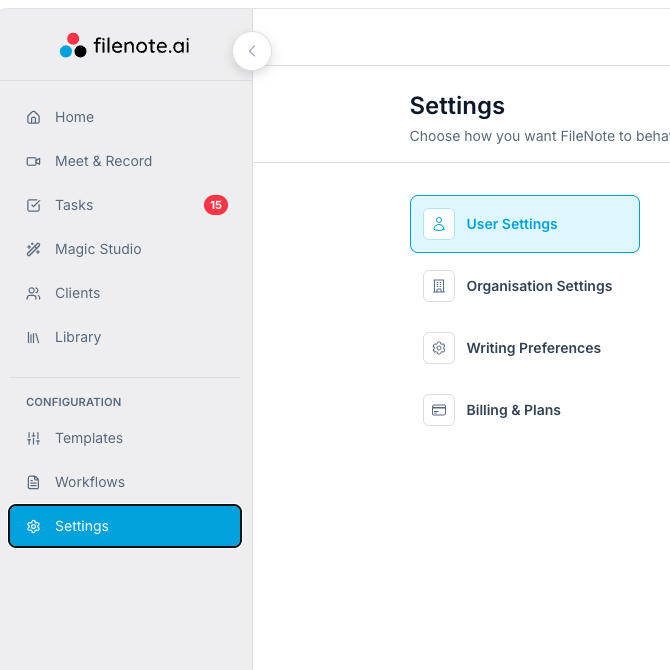
Step 3: Turn on the delivery toggle
Locate the toggle labeled 'Receive all outputs in Platform' and switch it to the ON position and Save.
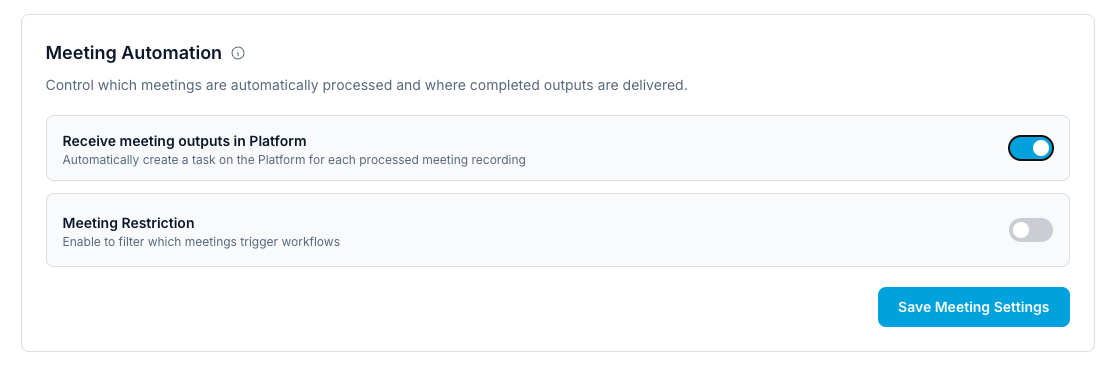
Important Note: Once you activate this toggle, your recorded meeting outputs will no longer be sent to you as email attachments. All future outputs will be securely generated and stored directly within the Filenote AI platform for easy access!
Was this article helpful?
That’s Great!
Thank you for your feedback
Sorry! We couldn't be helpful
Thank you for your feedback
Feedback sent
We appreciate your effort and will try to fix the article